Php: How to Unset $_files[file][tmp_name] After Uploading
PHP File Upload to Server with MySQL Database
by Vincy. Last modified on February 1st, 2022.
File upload is an important component in building websites. This article will assist yous to implement a file upload to the server characteristic with PHP and a MySQL database.
Instance use cases of where the file upload may exist needed in a website,
- Photo upload via member profile page.
- Import CSV or Excel to Database to insert bulk data.
- Have documents like KYC, CV from the user via a form.
Let us run across how to code PHP file upload for a website. You can dissever this commodity into the following sections.
- PHP file upload – A quick case.
- File upload – server-side validation.
- Upload file to the server with database.
- Upload file as a hulk to the database.
PHP file upload – Quick example
<?php if (isset($_FILES['upload_file'])) { move_uploaded_file($_FILES["upload_file"]["tmp_name"], $_FILES["upload_file"]["name"]); } ?> <form name="from_file_upload" action="" method="post" enctype="multipart/class-data"> <div class="input-row"> <input type="file" name="upload_file" take=".jpg,.jpeg,.png"> </div> <input type="submit" proper name="upload" value="Upload File"> </course> This quick example shows a simple code to attain PHP file upload. It has an HTML form to choose a file to upload. Let the course with the following attributes for supporting file upload.
- method=post
- enctype=multipart/grade-data
Past choosing a file, it will be in a temporary directory. The $_FILES["upload_file"]["tmp_name"] has that path. The PHP move_uploaded_file() uploads the file from this path to the specified target.
| $_FILES['<file-input-name>']['tmp_name'] | PHP file upload temporary path |
| $_FILES['<file-input-name>']['proper name'] | File name with extension |
| $_FILES['<file-input-name>']['type'] | File MIME type. Eg: image/jpeg |
| $_FILES['<file-input-name>']['size'] | File size (in bytes) |
| $_FILES['<file-input-name>']['error'] | File upload fault code if whatever |
| $_FILES['<file-input-proper noun>']['full_path'] | Full path every bit sent by the browser |
The class allows multi-file upload past having an array of file input.
PHP file upload configuration
Ensure that the server environment has enough settings to upload files.
- Check with the php.ini file if the file_uploads = on. Mostly, it will be on by default.
More optional directives to alter the default settings
- upload_tmp_dir – to change the system default.
- upload_max_filesize – to exceed the default limit.
- max_file_uploads – to break the per-request file upload limit.
- post_max_size – to breaks the Postal service data size.
- max_input_time – to set the limit in seconds to parse request information.
- max_execution_time – time in seconds to run the file upload script.
- memory_limit – to set the memory limit in bytes to exist allocated.
File upload – server-side validation
When file uploading comes into the picture, and so there should be proper validation. It will prevent unexpected responses from the server during the PHP file upload.
This code checks the following 4 atmospheric condition before moving the file to the target path. It validates,
- If the file is not empty.
- If the file does not already exist in the target.
- If the file type is 1 of the allowed extensions.
- If the file is within the limit.
It shows only the PHP script for validating the uploaded file. The class HTML will exist the aforementioned as that of the quick example.
file-upload-validation.php
<?php if (isset($_POST["upload"])) { // Validate if not empty if (!empty($_FILES['upload_file']["name"])) { $fileName = $_FILES["upload_file"]["name"]; $isValidFile = true; // Validate if file already exists if (file_exists($fileName)) { echo "<span>File already exists.</span>"; $isValidFile = imitation; } // Validate file extension $allowedFileType = assortment( 'jpg', 'jpeg', 'png' ); $fileExtension = strtolower(pathinfo($fileName, PATHINFO_EXTENSION)); if (! in_array($fileExtension, $allowedFileType)) { echo "<bridge>File is not supported. Upload only <b>" . implode(", ", $allowedFileType) . "</b> files.</span>"; $isValidFile = fake; } // Validate file size if ($_FILES["upload_file"]["size"] > 200000) { echo "<span>File is too big to upload.</span>"; $isValidFile = 0; } if ($isValidFile) { move_uploaded_file($_FILES["upload_file"]["tmp_name"], $fileName); } } else { echo "No files have been chosen."; } } ?> Upload file to the server with database
This section gives a total-fledged PHP file upload example. It is with add, edit, preview, listing images features. The add together/edit allows users to choose an paradigm file to upload to the server.
The dwelling house folio displays a list of uploaded images with edit, delete activity controls. The edit screen will prove the preview of the existing file.
PHP file upload and add together a new row to the database
This code is for showing a HTML grade with a file upload choice. This allows users to choose files to upload to the server.
The PHP lawmaking receives the uploaded file data in $_FILES. In this code, it checks for basic file validation to make certain of its uniqueness.
Then, it calls functions to upload and insert the file path to the database.
The uploadImage runs PHP move_upload_files() to put the uploaded file in a directory.
The insertImage calls database handlers to insert the uploaded path to the database.
image-upload-list-preview-edit/insert.php
<?php namespace Phppot; use Phppot\DataSource; require_once __DIR__ . '/lib/ImageModel.php'; $imageModel = new ImageModel(); if (isset($_POST['send'])) { if (file_exists('../uploads/' . $_FILES['image']['proper name'])) { $fileName = $_FILES['image']['proper noun']; $_SESSION['bulletin'] = $fileName . " file already exists."; } else { $effect = $imageModel->uploadImage(); $id = $imageModel->insertImage($upshot); if (! empty($id)) { $_SESSION['message'] = "Paradigm added to the server and database."; } else { $_SESSION['bulletin'] = "Epitome upload incomplete."; } } header('Location: index.php'); } ?> <html> <head> <link href="assets/way.css" rel="stylesheet" blazon="text/css" /> </head> <body> <div course="form-container"> <h1>Add new epitome</h1> <course activeness="" method="mail service" name="frm-add" enctype="multipart/grade-information" onsubmit="render imageValidation()"> <div Class="input-row"> <input type="file" name="epitome" id="input-file" class="input-file" take=".jpg,.jpeg,.png"> </div> <input type="submit" proper noun="send" value="Submit" class="btn-link"> <span id="message"></span> </div> </form> <script src="https://code.jquery.com/jquery-3.half-dozen.0.min.js" integrity="sha256-/xUj+3OJU5yExlq6GSYGSHk7tPXikynS7ogEvDej/m4=" crossorigin="anonymous"></script> <script src="assets/validate.js"></script> </torso> </html> 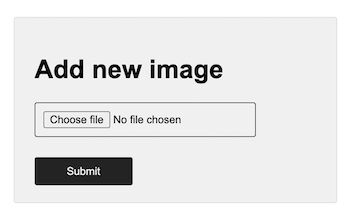
List of uploaded images with edit, delete actions
This is an extension of a usual PHP file upload example. It helps to build a file library interface in an awarding.
This folio reads the uploaded images from the database using PHP. The getAllImages function returns the prototype path data in an array format.
The list folio iterates this array and lists out the result. And it links the records with the appropriate edit, delete controls.
image-upload-list-preview-edit/alphabetize.php
<?php namespace Phppot; apply Phppot\DataSource; require_once __DIR__ . '/lib/ImageModel.php'; $imageModel = new ImageModel(); ?> <html> <caput> <title>Display all records from Database</title> <link href="assets/style.css" rel="stylesheet" blazon="text/css" /> </caput> <body> <div grade="image-datatable-container"> <a href="insert.php" class="btn-link">Add Image</a> <table class="paradigm-datatable" width="100%"> <tr> <th width="eighty%">Image</th> <th>Activeness</th> </tr> <?php $result = $imageModel->getAllImages(); ?> <tr> <?php if (! empty($result)) { foreach ($result every bit $row) { ?> <td><img src="<?php echo $row["paradigm"]?>" form="contour-photo" alt="photo"><?php echo $row["name"]?> </td> <td><a href="update.php?id=<?php echo $row['id']; ?>" class="btn-action">Edit</a> <a onclick="confirmDelete(<?php echo $row['id']; ?>)" form="btn-action">Delete</a></td> </tr> <?php } } ?> </table> </div> <script src="https://code.jquery.com/jquery-3.half dozen.0.min.js" integrity="sha256-/xUj+3OJU5yExlq6GSYGSHk7tPXikynS7ogEvDej/m4=" crossorigin="anonymous"></script> <script type="text/javascript" src="assets/validate.js"></script> </body> </html> 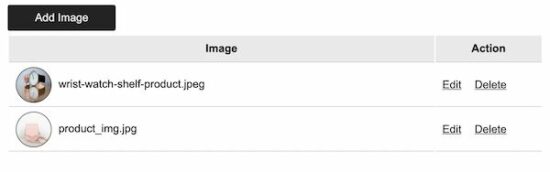
Edit form with file preview
This shows an edit form with an uploaded file preview. It allows replacing the file by uploading a new one.
The grade action passes the id of the record to update the file path in the database.
The PHP code calls the updateImage with the upload result and the record id.
paradigm-upload-list-preview-edit/update.php
<?php namespace Phppot; employ Phppot\DataSource; require_once __DIR__ . '/lib/ImageModel.php'; $imageModel = new ImageModel(); if (isset($_POST["submit"])) { $result = $imageModel->uploadImage(); $id = $imageModel->updateImage($result, $_GET["id"]); } $result = $imageModel->selectImageById($_GET["id"]); ?> <html> <head> <link href="assets/style.css" rel="stylesheet" type="text/css" /> </head> <body> <div course="form-container"> <h1>View/Edit image</h1> <form action="?id=<?php echo $result[0]['id']; ?>" method="mail" proper name="frm-edit" enctype="multipart/class-data" onsubmit="return imageValidation()"> <div form="preview-container"> <img src="<?php echo $consequence[0]["image"]?>" class="img-preview" alt="photo"> <div>Name: <?php echo $outcome[0]["proper noun"]?></div> </div> <div Class="input-row"> <input type="file" name="image" id="input-file" form="input-file" have=".jpg,.jpeg,.png" value=""> </div> <button type="submit" name="submit" course="btn-link">Salvage</button> <span id="message"></span> </div> </form> <script src="https://lawmaking.jquery.com/jquery-iii.vi.0.min.js" integrity="sha256-/xUj+3OJU5yExlq6GSYGSHk7tPXikynS7ogEvDej/m4=" crossorigin="anonymous"></script> <script src="avails/validate.js"></script> </body> </html> 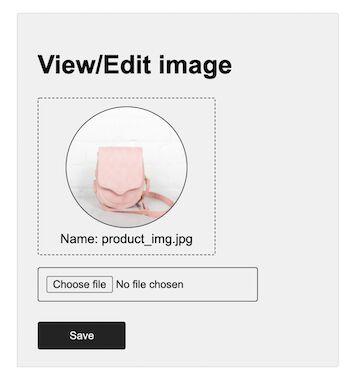
The delete action is triggered after user confirmation. It removes the file path from the database.
delete.php
<?php namespace Phppot; apply Phppot\DataSource; require_once __DIR__ . '/lib/ImageModel.php'; $imageModel = new ImageModel(); $id=$_REQUEST['id']; $result = $imageModel->deleteImageById($id); header("Location: index.php"); ?> PHP model class to upload file
It contains functions to upload files to a directory and to the database. The PHP file upload office sets a target to put the uploaded file.
It processes the PHP $_FILES array to get the file information. It prepares the database query by using the file parameter to perform read, write.
imageModel.php
<?php namespace Phppot; utilise Phppot\DataSource; class ImageModel { private $conn; office __construct() { require_once 'DataSource.php'; $this->conn = new DataSource(); } function getAllImages() { $sqlSelect = "SELECT * FROM tbl_image"; $result = $this->conn->select($sqlSelect); return $result; } function uploadImage() { $imagePath = "uploads/" . $_FILES["image"]["proper name"]; $proper noun = $_FILES["image"]["proper noun"]; $result = move_uploaded_file($_FILES["paradigm"]["tmp_name"], $imagePath); $output = assortment( $name, $imagePath ); return $output; } public role insertImage($imageData) { print_r($imageData); $query = "INSERT INTO tbl_image(name,image) VALUES(?,?)"; $paramType = 'ss'; $paramValue = array( $imageData[0], $imageData[one] ); $id = $this->conn->insert($query, $paramType, $paramValue); render $id; } public role selectImageById($id) { $sql = "select * from tbl_image where id=? "; $paramType = 'i'; $paramValue = array( $id ); $upshot = $this->conn->select($sql, $paramType, $paramValue); return $result; } public role updateImage($imageData, $id) { $query = "UPDATE tbl_image Prepare proper noun=?, image=? WHERE id=?"; $paramType = 'ssi'; $paramValue = assortment( $imageData[0], $imageData[one], $_GET["id"] ); $id = $this->conn->execute($query, $paramType, $paramValue); return $id; } /* * public function execute($query, $paramType = "", $paramArray = array()) * { * $id = $this->conn->set($query); * * if (! empty($paramType) && ! empty($paramArray)) { * $this->bindQueryParams($id, $paramType, $paramArray); * } * $id->execute(); * } */ function deleteImageById($id) { $query = "DELETE FROM tbl_image WHERE id=$id"; $event = $this->conn->select($query); return $result; } } ?> Upload epitome as a blob to the database
Though this example comes as the terminal, I guess it will exist very useful for most of you readers.
Uploading the file as a blob to the database helps to move the file binary data to the target database. This example achieves this with very few lines of code.
Uploading image file blob using database insert
This file receives the uploaded file from PHP $_FILES. It extracts the file binary data by using PHP file_get_contents() function.
Then, it binds the file MIME type and the blob to the prepared query statement.
The lawmaking specifies the parameter type as 'b' for the file blob data. First, information technology binds a Cipher value for the blob field.
So, it sends the file content using send_long_data() function. This function specifies the query parameter index and file blob to bind information technology to the statement.
file-blob-upload/index.php
<?php if (!empty($_POST["submit"])) { if (is_uploaded_file($_FILES['userImage']['tmp_name'])) { $conn = mysqli_connect('localhost', 'root', '', 'blog_eg'); $imgData = file_get_contents($_FILES['userImage']['tmp_name']); $imageProperties = getimageSize($_FILES['userImage']['tmp_name']); $nil = NULL; $sql = "INSERT INTO tbl_image_data(image_type ,image_data) VALUES(?, ?)"; $stmt = $conn->prepare($sql); $stmt->bind_param("sb", $imageProperties['mime'], $null); $stmt->send_long_data(one, $imgData); $stmt->execute(); $currentId = $stmt->insert_id; } } ?> <html> <head> <link href="assets/style.css" rel="stylesheet" blazon="text/css" /> </head> <body> <div class="form-container"> <h1>Upload Epitome Blob</h1> <form action="" method="post" name="frm-edit" enctype="multipart/grade-data" > <?php if(!empty($currentId)) { ?> <div class="preview-container"> <img src="paradigm-view.php?image_id=<?php echo $currentId; ?>" class="img-preview" alt="photo"> </div> <?php } ?> <div Class="input-row"> <input blazon="file" name="userImage" id="input-file" form="input-file" accept=".jpg,.jpeg,.png" value="" required> </div> <input blazon="submit" name="submit" class="btn-link" value="Salvage"> <bridge id="message"></span> </div> </class> </body> </html> This file is to read a blob from the database and show the preview. It will be specified in the <img> tag 'src' attribute with the appropriate image id.
file-blob-upload/image-view.php
<?php $conn = mysqli_connect('localhost', 'root', '', 'blog_eg'); if(isset($_GET['image_id'])) { $sql = "SELECT image_type,image_data FROM tbl_image_data WHERE id = ?"; $stmt = $conn->gear up($sql); $stmt->bind_param("i", $_GET['image_id']); $stmt->execute(); $outcome = $stmt->get_result(); $row = $result->fetch_array(); header("Content-type: " . $row["image_type"]); echo $row["image_data"]; } mysqli_close($conn); ?> 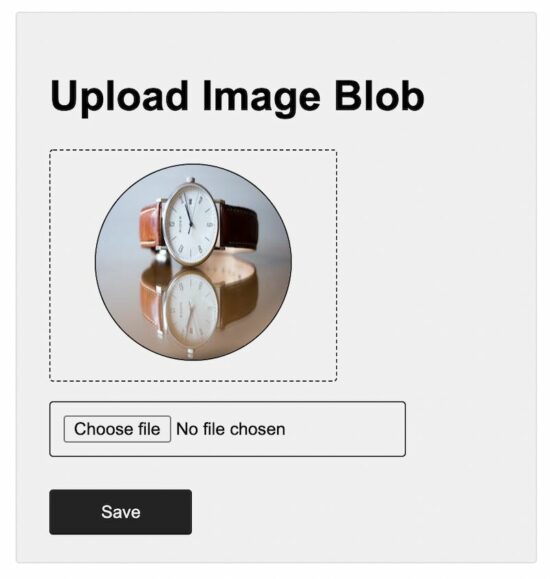
Decision
Thus, we have seen a detailed article to learn file upload. I swear we accept covered near of the examples on PHP file upload.
We saw lawmaking in all levels from simple to elaborate file upload components. I promise, this will be helpful to know how to build this on your ain.
Download
↑ Dorsum to Acme
wardlawwitheyesse1966.blogspot.com
Source: https://phppot.com/php/php-file-upload/
0 Response to "Php: How to Unset $_files[file][tmp_name] After Uploading"
Post a Comment