Can You Upload a Folder to Github
Github is Awesome. It allows you to practice a lot of absurd things, one of which is storing your files. Information technology's different from whatever other online data storage because you don't accept to re upload the entire file every time you brand some changes. You can work offline and so all of you have to do is commit the changes and push it to the origin.
Github allows many people to contribute to a single projection as well (Check this out to learn about CONTRIBUTION on GitHub).
The very offset time I tried to upload something on GitHub I found it very confusing. I went through a lot of blogs and videos merely couldn't detect any easy style to upload the files. Even though I am comfortable with using terminal commands, I didn't want to blindly use the git commands without understanding anything.
And then I found GitHub Desktop!
It can exist a very skillful alternative for someone who is just getting started. It doesn't only brand things easy. It too kind of lets you visualise and understand the git terminology.
Follow these like shooting fish in a barrel steps to successfully upload your kickoff file :
Since you are planning to use GitHub, I remember I can assume that you lot know how to create an account and how to install a software so I won't go into the details of the first 2 steps.
Y'all probably accept an business relationship already, you merely need to download and install GitHub Desktop.
Step 1 : Create a GitHub account
Step ii : Download and Install GitHub Desktop
Step 3: Setup your GitHub Desktop
If you are using Windows, it will automatically ask you to sign in and configure your git. If you are using a Mac, you volition have to go to Preferences and do all of that yourself.

Sign In to your Account

Configure Git

Become to Preference
Pace 4: Sign In to your GitHub account
If you click the top right icon on your "dashboard" it will give you a drop downward carte du jour, where you tin select "Your Profile" to go to your profile.

This is your dashboard

This is your profile
Step v: Create a Repository
You can think of "Repository"(repo in short) as a folder. You lot create one and keep files in them. To store your files on GitHub yous demand to create a repo first.
- Go to the "Repositories" tab on your profile
- Click "New"
- Name the repo
- Click "Create Repository"
(I named my repository "Hello_World".)
After you click "Create Repository" yous volition be redirected to a folio. The url of that page in the url of your repo. You volition need that for the rest of the steps.

Go to the "Repositories" tab on your pro le

Click "New"

Proper noun the repo and Click "Create Repository"

You will need the url of your repo.

If y'all get dorsum to your profile, you volition see that a new repository has been created.
You will be redirected to the repository page if you click on the repo.
You can get the url in that location as well.
Step vi: Clone your Repository
Now it'southward fourth dimension to commencement adding files to the new repo. Y'all tin work directly on GitHub, but information technology'due south not very convenient. Nosotros similar to work offline on our computer and so upload the edited work, don't we? GitHub allows you to do exactly that.
We showtime past cloning the repository which is kind of like downloading the folder to your computer. Only it is more flexible, you don't have to upload the whole folder again. You can work offline and merely push button the changes to GitHub.
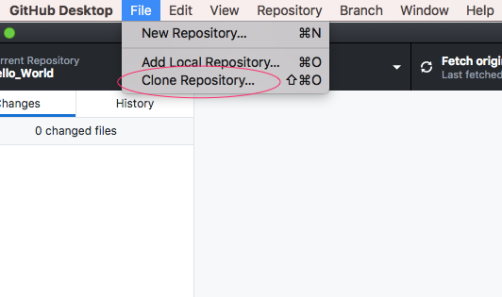
Get to GitHub Desktop and notice the "Clone Repository" pick.
Type the url and choose the local directory.
(I named the folder "Hello_World" besides.)

Go select your folder on GitHub desktop. Your binder will exist empty because you haven't added anything yet.
If you had any files in your repo, your folder would have contained all the files now.

Binder on GitHub Desktop

Folder on your computer
Step seven: Edit
Any changes you make to the folder volition be automatically shown on your GitHub Desktop. Make sure you have selected the electric current binder on your GitHub Desktop as well.
For case, I'll create iii new files in the "Hello_World" binder(left image) and they automatically appear on GitHub Desktop(right image)

Folder on your computer

Folder on GitHub Desktop
Step 8: Commit
When you edit a file y'all always save information technology before closing, don't you? Recollect of "Commit" every bit saving changes. You need to commit before you can upload it to GitHub.
Just like when you save a file you need to proper name information technology before you can click the salvage push button, on GitHub Desktop, you demand to name the commit before you lot can click the "Commit to master"
As soon as you start typing a name, the button will automatically get clickable.
(It is a proficient practise to name the commit in a meaningful style.)
Step 9: Push
Now that you have saved(committed) the changes , all you lot need to do is upload it. "Push" is uploading all the changes to Github.
Go ahead and click "Push Origin".
You lot will now be able to meet the uploaded files on your GitHub repository.

Push Origin

Files have been uploaded
Woo-hoo! Congratulations!
You lot accept successfully uploaded your first file!
So now that you know what all the terms hateful and you are confident enough to use GitHub, you can switch to the command line considering there are a lot of other things you can do with GitHub and some of them cannot be washed using GitHub Desktop. Y'all will need the command line.
You volition notice all the necessary git commands here.

Published by
Published
wardlawwitheyesse1966.blogspot.com
Source: https://sheikhadilina.wordpress.com/2018/03/05/upload-files-to-github-without-using-the-command-line/
0 Response to "Can You Upload a Folder to Github"
Post a Comment